
Tolerance Stack-up analysis is a design tool used to analyse and optimize a product assembly by calculating the cumulative effects of part tolerances in an assembly. Therefore it helps in ensuring smooth part assembly. Tolerance stack up calculator is used to calculate worst case and RSS tolerance. We suggest you use this guide to know in detail about tolerance stack up analysis.

How to Use Tolerance Stack up Calculator: Excel Based ?
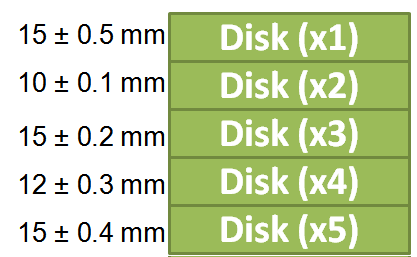
Let’s consider an example of five disks with different tolerance values. We will use this tolerance stackup calculator to calculate maximum and minimum height of the stack using worst case and RSS method.

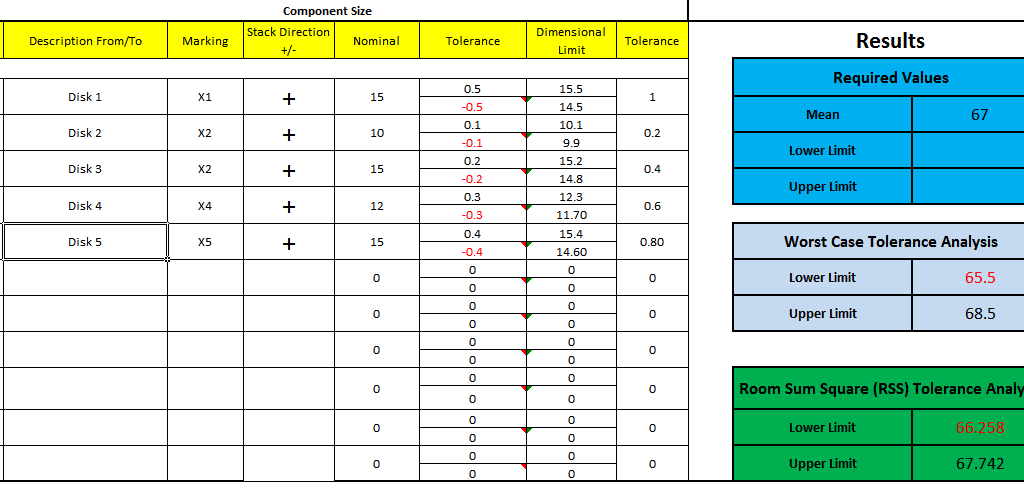
Here are the steps to be followed to use tolerance stackup calculator:
Step-1
Write down the description and marking of the dimension in first and second column respectively. This will Help you in identification of dimension in future. For example in this example we marked each disk as Disk 1 / Disk 2 respectively.
Step-2
In the third row we need to define the stack. In other words, the direction of the dimension. For example if we are adding one dimension in another then stack is positive. Whereas when one dimension is subtracted from another then stack is negative.
Step-3
Next Step is to write down dimension and upper/lower tolerance values in 4 and 5 columns respectively.
That’s It, Now it’s time to check the results !!!
Online Tolerance Stackup Calculator
Here is the list of steps to calculate the Worst Case, RSS and Monte Carlo Tolerance Stack
- Step 1: Enter the project Specific information
- Step 2: Define the dimension chain and upload the assembly drawing.
- Step 3: Add the required limits. These values are used to determine if the stack is within limit.
- Step 4: Enter nominal dimensions, upper and lower tolerances, tolerance direction and process capability.
- Step 5: Use Add Dimension button to add more dimentions to dimension chain
- Step 6: Press Refresh Now button to Enter upper and lower tolerances.
- Step 7: Observe and analyse the results.
- Step 8: Save the file in local drive for future reference (This feature does not saves the assembly drawing)
Result Interpretation
In the calculator result section, you can check the mean value of disk stack, lower & upper limits considering worst case and RSS tolerance stackup method.
To sum up, Tolerance stack up analysis is a very important part of product design. You can use this calculator for worst case and RSS tolerance stackup analysis.
We will keep updating this tolerance stackup calculator. Please add your comments, suggestions or questions in the comment box.
We will update the sheet with maximum 15 rows
What is the formulation for squared tolerance? please teach me how to formulae into excel too =)
Protected sheet was not ideal
Can you please help us know what improvements we need to do? We will improve the sheet
Hello, thanks for sharing. Is your spreadsheet 3-sigma? Is it possible to add the capability to change between 3-sigma, 6-sigma, etc?
We are working on the update of spread sheet. Very soon you will get additional capabilities
Thanks for sharing! could you add 6-sigma?
What is the password for opening this file ?
There is no password. You can open it and do calculations
you have the cells password protected, whats the password to unlock?
sorry nevermind the left side is the editable input and value shows up on the right cell, please disregard! thanks again
I think you should review the formulas again. I have a nominal measurement of .347mm in cell E19 and a max. tolerance of .05 mm in cell F20. When calculated, cells G19 and G20 read a lower limit of .297mm and a max of .397mm. I would think it should read .342 mm and .352 mm. My other cells are formulated fine. Nothing can be corrected with the password protection.
smleasedesign will unprotect the sheet.
Still protected cant verify the calculations or add project name .ect looks good but cant use it. =(
Figured it out
1. download the file
2. right click and open with 7zFM.exe “(7zip file manager) you will need to have 7zip downloaded”
3. browse through folders “xl” then “worksheets”
4. in worksheets you will see “sheet1.xml” right click this file and select “Edit”
5. use Ctrl+F and look for and delete this
6. save and close, allow sheet update
7. enjoy your unlocked excel doc. =)